
Lion OTT Premium IPTV – Installation Guide
The Lion OTT Premium IPTV Installation Guide makes it easy to set up the service on Android TVs, Firestick, iOS devices, Smart TVs, Windows and Roku — step by step, in minutes.
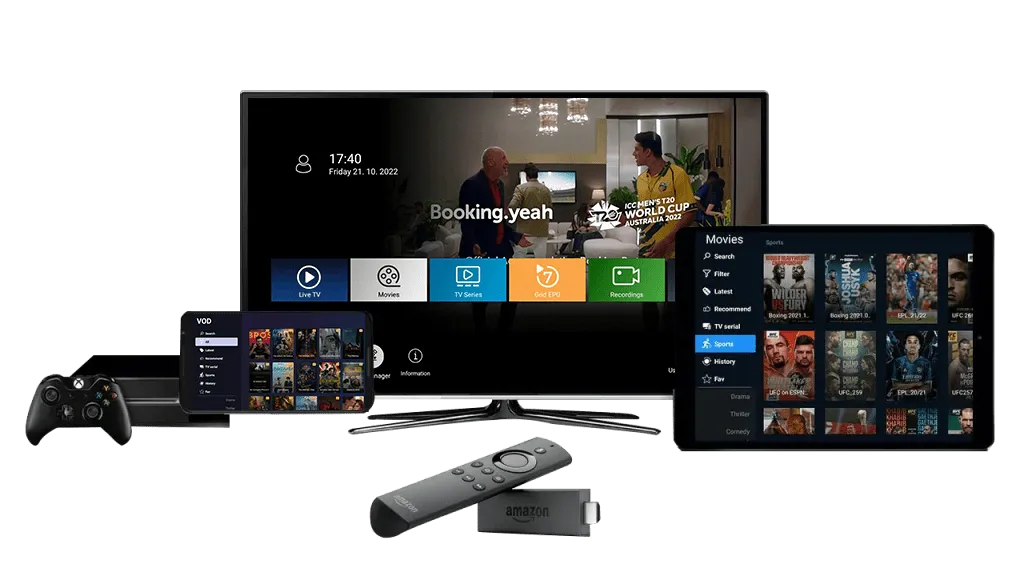
Setting Up LionOTT Premium IPTV On Compatible Devices
Next, we’ll show you how to use LionOTT Premium IPTV on each of the devices we just talked about, step by step. Pick your device below.
We recommend the official LionOTT Premium IPTV app on Android-supported devices such as Android Boxes, Smart TVs and Firestick. Paste the download link into any browser or downloader, or use the Downloader code below — it is the easiest route.
- Open the Play Store or App Store on your Firestick and search for the Aftvnews Downloader app, then install it.
- Open Downloader and enter the Lion OTT IPTV downloader code 150797 — the file will begin downloading.
- Install the LionOTT Premium IPTV app once the download finishes.
- Enter the Lion OTT IPTV username and password we provide to unlock live channels and movies.
- Message us on WhatsApp for a free trial or to view the subscription plans.
For iOS devices — iPhone, iPad, MacBook and Apple TV — we recommend Smarters Player Lite or Ibo Player.
- Install Smarters Player Lite or Ibo Player from the App Store.
- Open the app you downloaded.
- Get your login information from our WhatsApp support and start watching.
We do not have an official WebOS app yet, so on Samsung and LG Smart TVs we recommend using the Ibo Player app to watch Lion OTT.
- Go to your TV app store, search for “Ibo Player” and download it.
- Open Ibo Player and write down the MAC address and device key shown on screen.
- Send that key to our WhatsApp support — we will add the playlist to your Ibo Player.
- Pick a subscription plan that suits you to keep using the service.
Windows PCs and laptops are supported through the standard IPTV player apps available in the Microsoft Store.
- Open the Windows app store and search for IPTV Player or IPTV Smarters Player.
- Install whichever app you prefer.
- Request your login details from the Lion OTT IPTV WhatsApp support team and sign in.
We suggest using IPTV Player to watch IPTV on Roku TVs — you can find and download it straight from the Roku app store.
- Open the Roku app store and search for IPTV Player.
- Install the app on your Roku device.
- Contact WhatsApp support for your login details, then sign in and start streaming.

Why To Choose Our 4K IPTV Service?
You can make secure payments, get instant activation, and get help from customer service 24 hours a day, seven days a week.
Serveurs Stables
Load-balanced premium servers tuned to stay online through peak match days and big events.
25k Live Channels
Worldwide channel coverage across sport, entertainment, news, kids and documentaries.
Replay inclus
Missed something? Rewind and watch back up to 7 days of past programming whenever you like.
FULL HD / 4K qualities
Crystal-clear Full HD and 4K streams with anti-freeze technology on supported channels.
Exclusive Prices
Straightforward pricing with no hidden fees, no contracts and no monthly surprises.
24/7 support
Real people on WhatsApp and Telegram, day or night, whenever you need a hand.
Frequently Asked Questions (FAQs)
Your Question Not Found Here? or You want to Report a Problem? Contact Us Directly to get Answers.
Contact UsWhich devices can use LionOTT Premium IPTV?
You can use LionOTT Premium IPTV on Android boxes, Android smart TVs, Firestick, LG and Samsung smart TVs, Roku TV, iOS devices, Windows PCs and more.
How do I set up LionOTT Premium IPTV on my Firestick or Android device?
You can get the official LionOTT app by clicking the download link, or by entering code 150797 into the Aftvnews Downloader app on your device.
Do I need to log in with a username and password to use the app?
Yes, you’ll need a working username and password to watch live channels and movies. To get them, just contact us for a free trial or a subscription plan.
Is the process of installing the same for all devices?
Depending on your device type the steps may be a little different, but our installation guide has step-by-step instructions for each one.
Can I set up LionOTT Premium IPTV without knowing anything about computers?
Of course. Our step-by-step guide makes it easy for beginners, and our support team is always there to help if you get stuck.
What should I do if I have problems during installation?
You can get help from our support team any time — message us on WhatsApp or Telegram and we’ll walk you through it.
Can I use the same subscription on more than one device?
Yes, you can use your subscription on more than one device, but it depends on your plan.
Customer Support
Stay In Touch With LionOTT Premium IPTV
If you encounter any issues with payment gateways or entering login details on your device, please reach out to us via WhatsApp immediately.
+44 7877 162001 WhatsAppTelegram
If you have got any issues with payment methods or entering login details on your device, please contact us via Telegram.
t.me/IPTV_Fire_stick4K TelegramOur dedicated support team is available around the clock. Please feel free to contact us at your convenience for prompt assistance.
officialLionOTT@gmail.com Email